

Archive
- An archival of a log requires it to be CLOSED.
- An archived log cannot receive new writes.
- A log does not need to be CLOSED to be exported.
- A log can be repeatedly exported (e.g. to multiple locations).
- More data can be appended to a log that was exported (but new data would not be reflected in the exported version of the log).
- File containing an X.509 certificate in PEM format
- File containing the PKCS private key in PEM format
- File containing the X.509 certificate for the CA
0001 Jan 1
Lifecycle
0001 Jan 1
The LogService is a system which manages a collection of logs. Each of these logs has a defined state which allows certain operations on that log or corresponds to actions that the system is taking on that log.
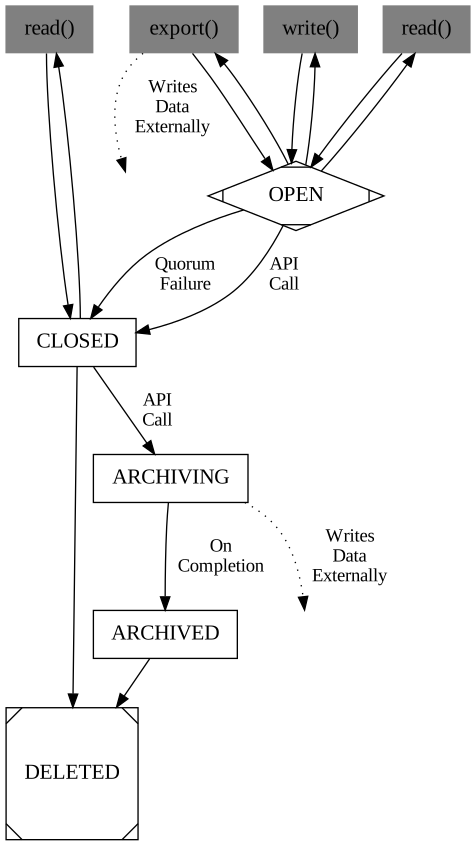
OPEN
This is the first state for a Log which is created in the LogService. A Log which is OPEN can be read from or written to. This Log has a corresponding Raft Group (a quorum of servers) who are participating in the hosting of this Log.
The only transition out from this state is to the CLOSED state.
CLOSED
The CLOSED state indicates that a Log is no longer accepting writes. The Log is still available to be read from the Raft Group.
A log can be transitioned from OPEN to CLOSED via the client API, but it can also be done automatically by the LogService. When a node which was participating in the Raft Group for this Log becomes unreachable, we consider this Group to be unhealthy and proactively close it to prevent any additional writes which may block due to too few nodes to accept a write.
The transition from OPEN to CLOSED is one-way: a Log cannot transition back to the OPEN state from the CLOSED state. A CLOSED log may be deleted from the system.
From the CLOSED state, a log can be transitioned to the ARCHIVING state or the DELETED state.
DELETED
This is a simple state that is short lived. It tracks the clean up of any state from the hosting this Log. There are no transitions out of this state.
ARCHIVING
The ARCHIVING state is reached by the archive API call from the LogService client. An archival of a log is equivalent to an export of that log from the beginning of the log file to a known location. See below for a tangent on exporting versus archiving.
This state indicates that the LogService is in the process of copying all records in the Log from the starting offset of the archival request to the specified location (a user-provided location or a preconfigured location). We expect the location to be in some remote storage system such as HDFS or S3.
The only transition out from this state is to ARCHIVED.
ARCHIVED
A Log can only reach the ARCHIVED state from the ARCHIVING state. This state is automatically transitioned into when the archival of a log is done in its entirety.
The action of archiving a log is an asynchronous process, managed by the leader of the Raft Group, thus watching for this state on a log indicates when the asynchronous archival is complete and the log can be safely read from the archived location.
The only transition out from this state is to DELETED.
Archive and Export
The archive and export API calls are very similar in nature but have important distinctions in their implementation. As mentioned above, an archival of a log is an export of the entire log to a specific location.
An archival of a log is specification of export in that:
An export of a log is more generic in that:
Visualization
To get a visual understanding of the log states, please see the image below:
 "
"
LogService Security
0001 Jan 1
This document aims to describe what the intended security deployment model of the Ratis LogService.
We will use integration into Apache HBase as an exemplar.
Background
TLS is technology capable of giving us “strong authentication” over network communication. One-way TLS can provide encrypted communication while two-way or “mutual” TLS can provide encrypted communication and authentication.
One feature of Ratis is that it is decoupled from the RPC transport in use. gRPC is the foremost transport, and can be configured to use one-way or two-way/mutual TLS. gRPC is the only transport for Ratis which supports TLS today.
However, the majority of components under the “Hadoop Umbrella” rely on Kerberos to guarantee strong authentication. In this respect, use of TLS is jarring. However, gRPC does not support SPNEGO (which allows Kerberos authentication) which all but requires the use of two authentication mechanisms when combining Ratis with other projects (like HBase).
We anticipate the use of the Ratis LogService as an “embedded WAL” inside of HBase RegionServers and Masters will result in HBase services using Kerberos authentication to talk to HDFS as well as TLS for Ratis-internal communication (intra-server Ratis communication and client-server Ratis communication).
Mutual TLS
Mutual TLS relies on a common certificate authority (CA) to issue all certificates which forms a circle of trust. Certificates generated by the same CA can be used to set up a mutual TLS connection. A certificate generated by one CA cannot be used to set up a mutal TLS connection to a service using a certificate generated by a different CA outside of the circle of trust. [1]
To control the clients and servers with one instance of the LogService, we want to use a single CA to generate certificates for clients and servers. We will consider this as an invariant going forward.
HBase Examplar
We expect the following material to be provided for every HBase service using Ratis:
OpenSSL is capable of creating each of these; however, for this document, we will assume that you already have these pre-made. The server certificate and private key are unique to every host participating in the HBase cluster. The server certificate and truststore are not sensitive, but the private key is sensitive and should be protected like a password.
Every component in HBase using the Ratis LogService would need to ensure that each LogService StateMachine is configured to use the server keystore and truststore. The LogService state machines would need to constructed with the appropriate configuration options to specify this TLS material:
RaftProperties properties = ...;

GrpcConfigKeys.TLS.tlsEnabled(properties);
GrpcConfigKeys.TLS.mutualAuthnEnabled(properties);
properties.set(GrpcConfigKeys.TLS.PRIVATE_KEY_FILE_KEY, "/path/to/server-private-key.pem");
properties.set(GrpcConfigKeys.TLS.TRUST_STORE_KEY, "/path/to/ca.crt");
properties.set(GrpcConfigKeys.TLS.CERT_CHAIN_FILE_KEY, "/path/to/server.crt");

RaftServer.Builder builder = RaftServer.newBuilder();
...
builder.setProperties(properties);

RaftServer server = builder.build();
Clients to the StateMachine would construct a similar configuration:
RaftProperties properties = ...;

GrpcConfigKeys.TLS.tlsEnabled(properties);
GrpcConfigKeys.TLS.mutualAuthnEnabled(properties);
properties.set(GrpcConfigKeys.TLS.PRIVATE_KEY_FILE_KEY, "/path/to/client-private-key.pem");
properties.set(GrpcConfigKeys.TLS.TRUST_STORE_KEY, "/path/to/ca.crt");
properties.set(GrpcConfigKeys.TLS.CERT_CHAIN_FILE_KEY, "/path/to/client.crt");

RaftClient.Builder builder = RaftClient.newBuilder();
...
builder.setProperties(properties);

RaftClient client = builder.build();
With Mutual TLS, there is no notion of a “client” or “server” only certificate. In the above example code, as long as the certificate and private key are generated using the same certificate authority, any should function.
For the LogService, this client setup would be hidden behind the facade of the LogService client API.
The HBase WALProvider implementation that uses the Ratis LogService would be providing the location of this TLS material via the HBase configuration (hbase-site.xml), passing it down into the WALProvider implementation. As the WALProvider is the broker that doles out readers and writers, and would also, presumably manage the creation of the StateMachines, it can set up the proper Ratis configuration from the HBase configuration.
[1] There are scenarios with shared trust across CA’s that enable other scenarios but these are ignored for the purpose of this document.